

Stripe
The Bridge billing integration can be connected to an Organization-owned Stripe account to manage the creation, authorization, capture, and refund of payments related to Bridge Services.
Stripe Concepts
Bridge will create Stripe Customers.
Bridge will create payment methods using Stripe’s Setup Intent API.
Bridge will create and manage payments using Stripe’s Payment Intent API.
Bridge will settle final payments using Stripe’s Invoice APIs.
Refer to the Stripe documentation for more details.
Getting Started
To set up the Stripe billing integration, reach out to the Bridge team directly.
You will need to provide a pair of Stripe API keys, one publishable key and one secret key. Bridge strongly recommends you first create a Stripe sandbox environment and provide these keys, to be connected to your Bridge sandbox environment. This will allow you to fully test the billing integration behavior prior to a production release.
You may opt to create a restricted secret key with limited scoped permissions. If so, the minimum permissions required to enable the Bridge integration are:
- Customer Write
- Setup Intent Write
- Payment Method Write
- Payment Intent Write
- Charge Write
- Invoice Write
Additionally, you will need to set up a Stripe webhook event destination targeting the Bridge system. This allows Bridge to receive and respond to various Stripe events.
The target for the Stripe Webhook will be the Bridge platform with a URL specific to your organization.
- Production: https://app.usebridge.com/api/webhooks/stripe/{your_organization_slug}
- Sandbox: https://app.usebridge.xyz/api/webhooks/stripe/{your_organization_slug}
You can find your organization slug in the Bridge dashboard organization settings.
The events you will need to include are:
- customer.created, customer.updated
- payment_intent.processing, payment_intent.requires_action, payment_intent.succeeded, payment_intent.payment_failed, payment_intent.canceled
- refund.created, refund.updated
- invoice.finalized, invoice.updated, invoice.paid, invoice.sent, invoice.voided, invoice.marked_uncollectible
Handling New Customers
Customer Creation
If Bridge is configured to handle customer creation, creating a new Patient in Bridge will automatically create a corresponding Customer profile in Stripe.
If you have existing Stripe Customer profiles for Patients, or you want to manage the creating of Customer profiles manually, you can update the Customer metadata with the following fields and Bridge will identify and connect them to the Patient profile to allow further billing integrations:
- bridgeOrganizationId: your Bridge Organization ID
- bridgePatientId: your Bridge Patient’s ID
Customer Payment Methods
Once a Bridge Patient has a connected Customer profile, you can use the Bridge Setup Intent API to generate a Stripe Setup Intent and receive a clientSecret token.
With the Stripe clientSecret, you can use Stripe’s Web Elements UI components (or similar) to collect payment method information from your user, which will become attached to the Customer profile and used for all future billing integrations.
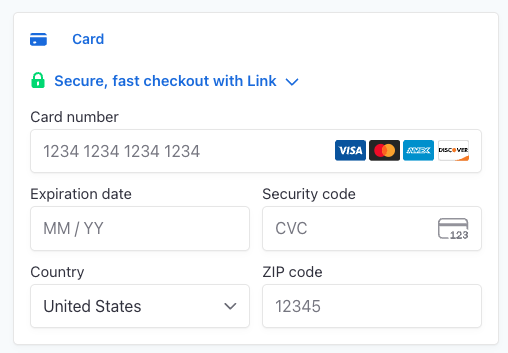
Should a payment attempt fail at any point, you may need to prompt the user to supply a new payment method using the above flow again.
Collecting Service Estimates
Creating an Estimate Charge
After creating a Service Eligibility, use the ServiceEligibility.id and Patient.id together to create an Estimate Charge. This record will be used to drive payment actions for a Service estimate, and inherits the same estimate amount that the Service Eligibility indicates.
ServiceEligibility.id and Patient.id will later be used as part of the Create Service API, associating payments collected using the Estimate Charge to that Service automatically.
See the Putting it together section for an example.
Authorize an Estimate Charge
Once created, the Estimate Charge can optionally be Authorized, verifying that the payment method is valid and able to cover the expected amount.
Authorization is not required, but is recommended. Authorizations in Stripe can be set to expire after a set amount of time.
If the provided payment method is invalid, possesses insufficient funds, or requires additional actions on behalf of the user, the Bridge API response will forward the Stripe-specific details for additional handling. This may require extra Stripe UI components to take additional actions, or else will require the Patient to provide a different payment method. For more detail, see the Stripe payment errors documentation.
An Estimate Charge that is returned with the AUTHORIZATION_FAILED status can be re-attempted once any additional action has been taken, or if a new payment intent is created.
Capture an Estimate Charge
When ready to collect payment, the Estimate Charge can be Captured.
If the provided payment method is invalid, possesses insufficient funds, or requires additional actions on behalf of the user, the Bridge API response will forward the Stripe-specific details for additional handling. This may require extra Stripe UI components to take additional actions, or else will require the Patient to provide a different payment method. For more detail, see the Stripe payment errors documentation.
An Estimate Charge that is returned with the CAPTURE_FAILED status can be re-attempted once any additional action has been taken, or if a new payment intent is created.
Cancelling Service Estimates
Cancel an Estimate Charge
An Estimate Charge than has been authorized, but not captured, will expire after several days if no action is taken. However, you can immediately Cancel the Estimate Charge if you wish.
Refund an Estimate Charge
If a captured Estimate Charge needs to be refunded prior to final billing for a Service, you can issue Refund. This may be necessary in the case where a scheduled service is cancelled.
If the refund cannot be completed for any reason, the Bridge API response will forward the Stripe-specific details for additional handling. For more detail, see the Stripe refund errors documentation.
Cancelling a Service
If a Service is cancelled, any associated Estimate Charges that have been captured will be automatically refunded.
For no-show scenarios, cancel the Service and record cancellationReason = NO_SHOW. Bridge will
refund captured estimate charges, if configured in a Billing integration.
Stripe Connect
Bridge does not currently route payments to multiple Connect accounts. All charges and invoices are created in your primary Stripe account.
Invoicing a Service
Invoice Creation
After a Service has been completed and claim adjudication has resolved, check the Bridge dashboard for the Service to enter the SETTLING status. This will indicate that a final invoice is ready to be generated. Invoices will be created if the integration is configured to do so.
Invoices are created in Stripe for the amount indicated by the final Patient responsibility amount, received as part of the finalized claim.
Invoice Collection
If a Service already has an estimate payment captured, the Invoice will include a line item for the captured estimate and the final balance will be adjusted accordingly. If this would bring the balance to zero, the Invoice will be marked PAID and the Service will transition to COMPLETED.
If the Invoice indicates a negative balance, a refund will be generated against the previously captured estimate amount. Assuming the refund is processed without issue, this will bring the Invoice balance to zero and allow the Service to be COMPLETED.
The Invoice with receipt PDF will be available, linking out to Stripe, from the Bridge dashboard.
Putting it together
The suggested workflow for collecting Service estimates through the Bridge API is as follows.
Create a Policy
POST /api/policies/v2
Create a Service Eligibility
POST /api/service-eligibility/v2
Create a Patient
If configured, this will create a Stripe Customer automatically. If not, create the Customer and include the metadata fields to correctly connect them to Bridge.
POST /api/patients/v2
Collect a payment method for the Patient
POST /api/integrations/stripe/setup-intent
Using the returned client_secret and Stripe’s Elements UI, prompt the user for a payment method.
Create an Estimate Charge for the Patient and Service Eligibility
POST /api/estimate-charges
Prior to the date of service, authorize the Estimate Charge
Authorize Stripe Estimate Charge
POST /api/estimate-charges/est_12345/authorize/stripe
If the response is not AUTHORIZED, prompt the Patient for corrective action or return to the payment method collection step to try a different method.
Schedule Service for the Patient, using the same Service Eligibility as for the Estimate Charge
Note that this Service is created with the same Service Eligibility as was previously used for the Estimate Charge. This associates payments captured via the Estimate Charge to the Service automatically.
POST /api/services/v2
On the day of service, capture the Estimate Charge
Capture Stripe Estimate Charge
POST /api/estimate-charges/est_12345/capture/stripe
If the response is not CAPTURED, prompt the Patient for corrective action or return to the payment method collection step to try a different method, then attempt payment collection again.
Error handling with Stripe
Should an attempted payment authorization or capture be unsuccessful, Stripe will provide additional details that Bridge will forward to you. The Stripe error objects will indicate what next steps you can take to either resolve an incomplete payment, or redirect the Patient to payment method collection again.